Hijacking Samsung TV Smart Hub Ads
I have a Samsung smart TV from 2022. At some point, the Smart Hub started displaying ads. I think it’s absolutely disgusting that a device that I paid for and own, and that doesn’t use any additional Samsung “free” services is forcing ads on me, just to generate additional revenue for Samsung from an already-sold device. I was blocking the ads via my Pi-hole instance, until I was tinkering with my homelab and networking setup not that long ago and broke something. That caused the ads to start appearing again, which reminded me of their existence.
Around the same time, the eMudhra CA certificate fiasco took place, and the “compromised” private key was added to mitmproxy. mitmproxy is an open-source project for inspecting, replaying and modifying HTTP(S) network traffic. Normally, in order for it to be able to intercept TLS-encrypted traffic, the “victim” device must trust a custom certificate created by mitmproxy - this way mitmproxy can decrypt the traffic, inspect it, and then re-encrypt it using a real certificate before forwarding it to the intended destination. Unfortunately, some devices don’t allow adding custom SSL certificates to their truststore - like my Samsung TV.
Intercepting TV traffic with mitmproxy
Mikrotik configuration (adapt to your router as needed)
# 192.168.0.7 is my raspberry-pi with mitmproxy
# 192.168.0.9 is my Samsung TV

/routing/table
add name=tv-proxy fib

/ip/route
add dst-address=0.0.0.0/0 gateway=192.168.0.7 routing-table=tv-proxy

/routing/rule
add src-address=192.168.0.9/32 action=lookup-only-in-table table=tv-proxy

/ip/firewall/filter
add chain=forward action=accept src-address=192.168.0.9 connection-state=established,related
add chain=forward action=accept dst-address=192.168.0.9 connection-state=established,related
Raspberry-Pi configuration
sudo iptables -I FORWARD 1 -s 192.168.0.9 -j ACCEPT
sudo iptables -I FORWARD 1 -d 192.168.0.9 -m conntrack --ctstate ESTABLISHED,RELATED -j ACCEPT
sudo iptables -t nat -A PREROUTING -i eth0 -s 192.168.0.9 -p tcp --dport 80 -j REDIRECT --to-port 8080
sudo iptables -t nat -A PREROUTING -i eth0 -s 192.168.0.9 -p tcp --dport 443 -j REDIRECT --to-port 8080
sudo iptables -t nat -A POSTROUTING -s 192.168.0.9/32 -o eth0 -j MASQUERADE
mitmproxy configuration
uvx --from mitmproxy mitmweb --web-port 8083 -p 8081 --emudhra --ssl-insecure --mode transparent --set stream_large_bodies=1m
With the eMudhra certificate being exposed, anyone can now create a custom SSL certificate for an arbitrary domain (let’s say a Samsung ad network domain), sign it with the compromised CA certificate, and all devices that have the eMudhra CA certificate in their truststores will trust the custom SSL certificate. This is why software vendors were racing (some more, some less) to revoke the certificate from their truststores, so that browsers, computers and smart phones wouldn’t be susceptible to this kind of attack. Luckily for me, Samsung did not yet release an update for my TV that would revoke the certificate. This allowed me to route all traffic from the TV through mitmproxy and get a list of all the domains and endpoints that my TV talks to, but also see the structure of the requests and response payloads.
Turns out the flow is pretty simple: when something interesting happens on the
TV, the TV sends a request to https://catalyst.adgrx.com/adopportunity with
some details about the TV. When you return to the Smart Hub, the “home screen”
of the TV, so to speak, the TV sends requests to
https://tvx.adgrx.com/impressions/tile again with some details about the TV,
and in response it receives either an empty JSON object ({}) or a JSON
response describing an ad to display at the top of the Smart Hub.
So I wrote a simple server in Rust that handles the same /impressions/tile
endpoint and always returns JSON with an ad, except instead of links to an
actual ad image, it has a link to a random photo of my family. I also included
a simple frontend where I can manage the images that should be served.
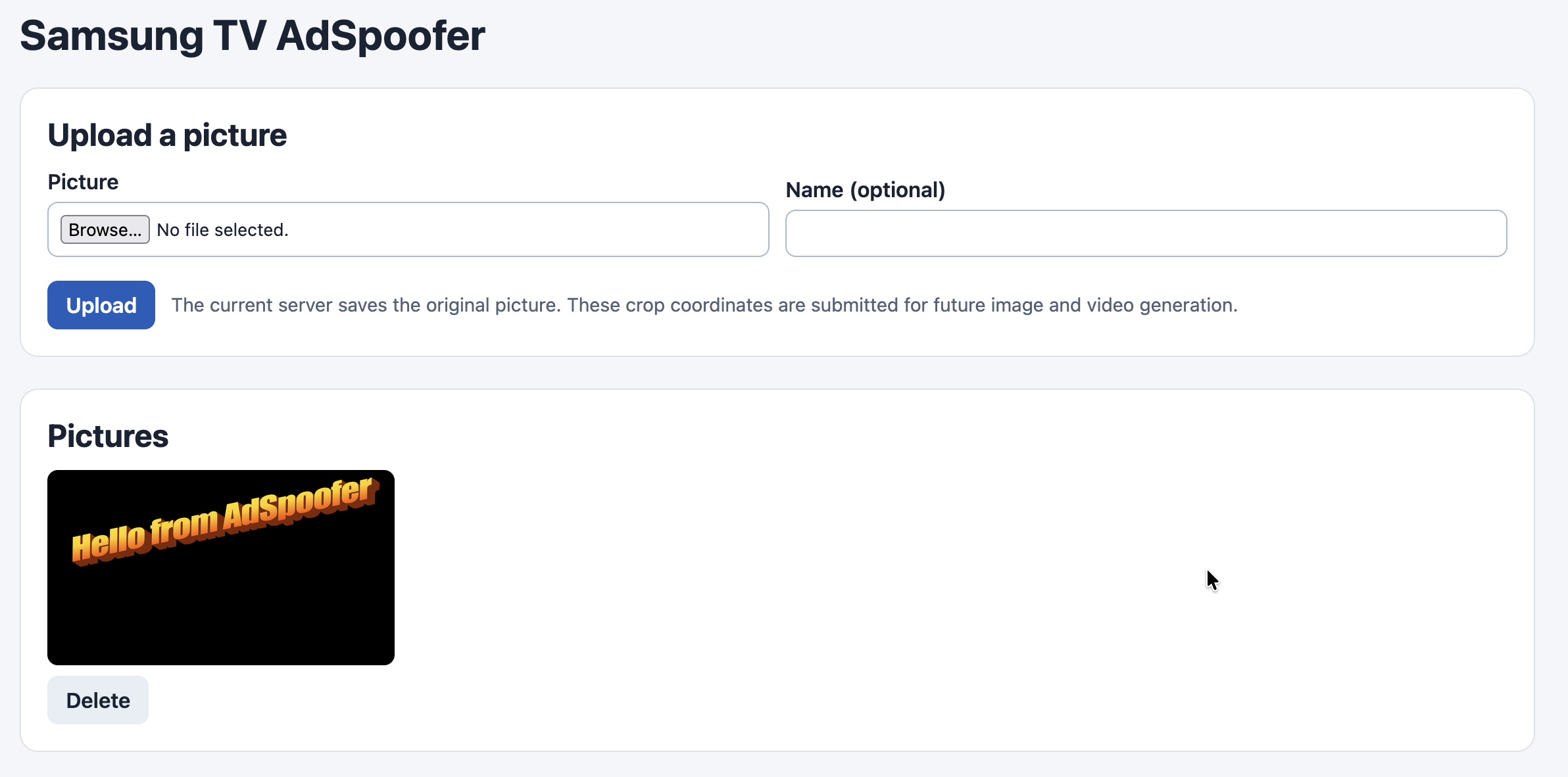
Additionally, the server blackholes any other *.adgrx.com request and returns
204 No Content to prevent all the tracking from getting out of my home
network.
I then generated a wildcard SSL certificate for *.adgrx.com, signed it with
the compromised eMudhra CA certificate and added it to the app.
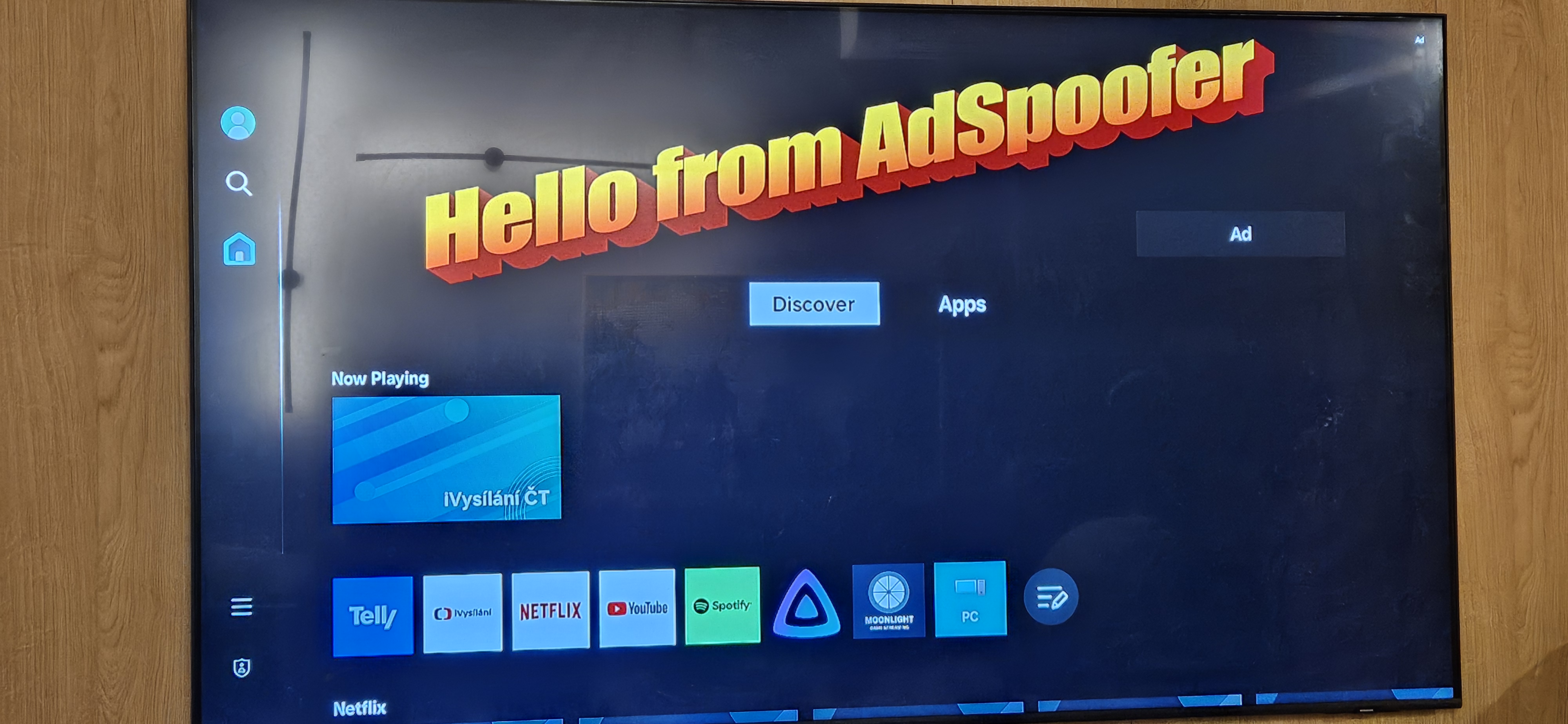
Finally, I configured my router to resolve *.adgrx.com to the IP address of
my NAS, where I am running the ad spoofer, and now when we launch the TV, it
looks like this:
The source code for the adspoofer is on my GitHub in case anyone wants to try it out. It works with my particular model of TV, but other Samsung TVs might use different endpoints or expect a different shape of the response. If you make it work with your TV, feel free to send a patch!
Obviously, this will only work as long as my TV trusts the compromised eMudhra certificates, which is either until the certificate expires or until Samsung pushes out an update, revoking the certificate. The latter I can prevent by blocking updates to the TV (which carries its own set of risks), but about that another time.